Sonoff-OTA
Sonoff S60 → Tasmota or ESPHome, OTA
Flash it, don’t smash it.






Fully automated ‘Over The Air’ firmware conversion
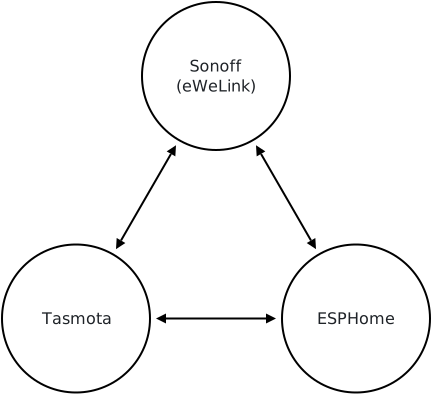
Turn your stock Sonoff S60 smart plug into one running Tasmota or ESPHome using OTA method - no soldering, no taking the plug apart. Move the plug between the two, or back to Sonoff’s own firmware.
Conversion with this tool is fully automated end to end, with checks at every stage. It is resumable and can be restarted at any point.
No More Soldering
Until now, the established way to put Tasmota on an S60 was to open it, perform some soldering and flash it over USB-serial - hard work, because the case is plastic-welded shut.
The community threads for the soldering method:
- UK version: arendst/Tasmota#22554
- EU version: arendst/Tasmota#21255
Indistinguishable
Converted plugs end up identical to a plug flashed over USB
The final automated checks verify this by reading their flash back at the end of the conversion. Every block of it is read back before the plug switches to it.
What you need
The plug
A Wi-Fi Sonoff S60, e.g:
UK: S60TPG | European: S60TPF
(Not the Zigbee S60)
An eWeLink account
Free. A throwaway one is fine. The plug has to be added to it first.
A computer
Linux, macOS or Windows, with Wi-Fi.
Administrator rights
Required to auto-add one temporary firewall rule (allowing the plug to communicate with the computer, removed when the run finishes).
What it has been run on
Model
- ✅ S60TPG - UK / Type G
- ✅ S60TPF - EU / Type E/F
Stock firmware
- ✅ 1.1.1
- ✅ 1.2.0
Computer
- ✅ Linux
- ✅ Windows
- ✅ macOS
Let’s go
You’re walked through every step of the conversion.
Linux / MacOS (Terminal)
git clone https://github.com/adamsthws/Sonoff-OTA.git
cd Sonoff-OTA
sh start.sh
Windows (Terminal)
git clone https://github.com/adamsthws/Sonoff-OTA.git
cd Sonoff-OTA
.\start.ps1
– or –
download as a zip, double-click start.cmd
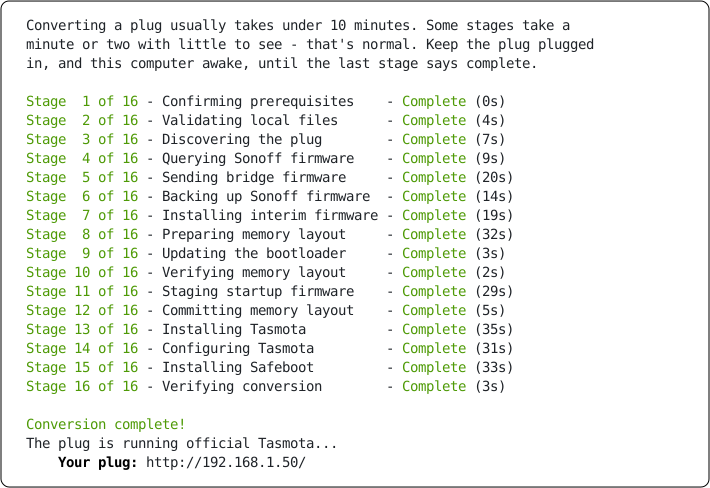
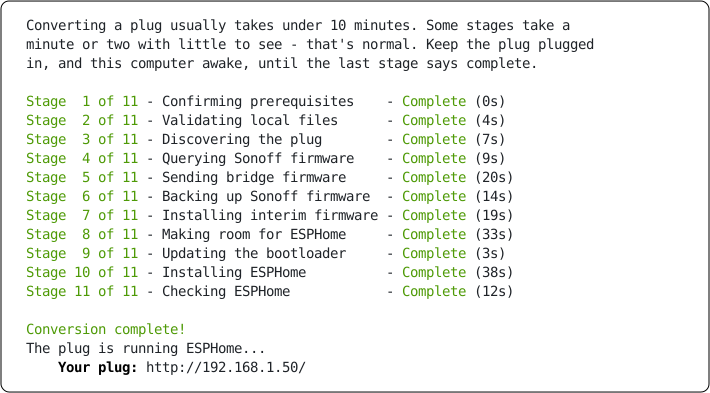
What you’ll see
Tasmota:
ESPHome:
If you have to stop
E.g. you close the window, lose your Wi-Fi, run out of time - it doesn’t matter. Run the
same command again - start.cmd or sh start.sh.
It remembers which plug it was working on and what it had done. Where a step was interrupted, it checks the plug to work out where to resume from.
What you end up with
Tasmota: Official Tasmota
ESPHome: Official ESPHome
Sonoff: A full backup of the plug’s Sonoff firmware to restore later.
Afterward, Tasmota and ESPhome updates are applied as normal.
If something goes wrong
Start with docs/troubleshooting.md - it covers the problems that actually came up while this was being built.
Reporting how it went
Whether it worked first time or stopped partway, please report back on how it went here:
A clean conversion, a run that stopped partway, or only the read-only checks - all of it is useful.
Reading the thread is the quickest way to see how it went for others.
More detail
- docs/technical-details.md - the firmware bundle, secrets handling, memory layout, notes for devs.
- docs/what-happens.md - how it works and what happens to the plug, step by step.
- docs/troubleshooting.md - problems met so far and their fixes.
- docs/emulator.md - the whole conversion run against an emulated s60 plug.
- docs/unattended.md - running a conversion with nobody at the keyboard - for testing.
- docs/testing.md - how the tool is tested: unit tests, the emulator, every fault in the way of every step, and real plugs.
- docs/updating-firmware.md - how the Tasmota and ESPHome the tool installs are moved to each new release.
- docs/private-backup.md - for the maintainer: how their own Sonoff backup is kept sealed and private, off their computer.
- docs/device-names.md - the name the plug goes by at each stage, where each is set, and how to change them.
- docs/upstream-contributions.md - bugs found and fixed while building this project.
- archive/docs/reference/ - the original research, the manual procedure and how the firmware format was decoded.
- docs/legal.md - how the project keeps backing up Sonoff’s firmware lawful, and what it asks of you.
Thanks
A big thank you to HG0161 and the SonoffS60OTA repository for laying the groundwork; working out the update mechanism, decoding the firmware format and proving the OTA route on real plugs. This repository carries that work on.
Thanks to p1otr for the ESPHome option and its S60 config.
Thanks too to everyone in the Tasmota threads for the UK and EU S60, whose open-the-case method came first.
Worked out with the Tasmota community’s discussion of this device.
See LICENSE and THIRD_PARTY_NOTICES.md.